The apps

Short notes on each piece of the suite. Versions match the public beta releases in the release manifest (2026-10-19).

AmiStudio launcher

0.1.10 beta

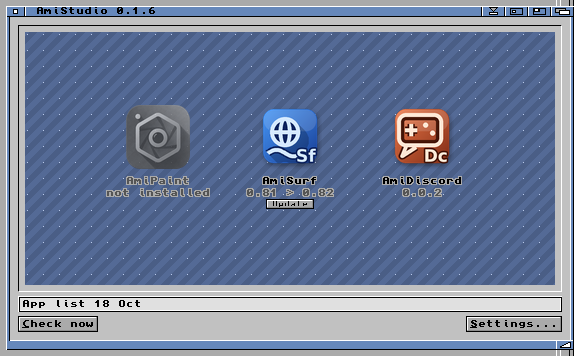
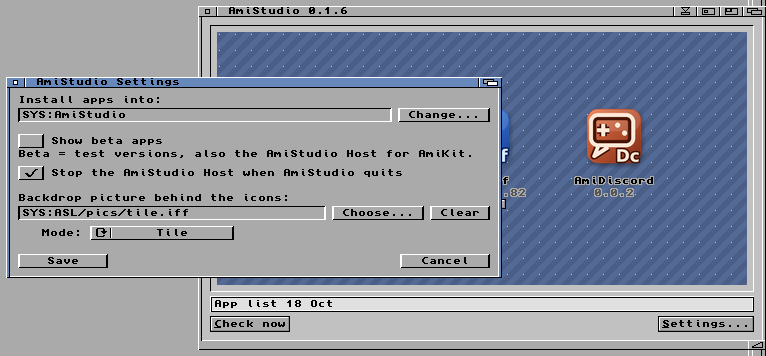
The home base on the Amiga. It reads the release manifest, shows each app as an icon, and installs or updates from GitHub Releases. Settings live in the drawer; you can put a backdrop picture behind the icons; and when you quit, it can stop the Host so nothing hangs around. It always unmounts Google Drive on quit. Check for updates covers the Host too, and when an app needs a newer Host (AmiDrive needs 0.1.8+), it offers to update and restart it for you.

Apps install into AmiStudio/Apps/. The Host and its data sit under AmiStudio/Host/. Turn Show beta apps on in Settings to see the current betas.

AmiPaint

1.0.66 beta

A paint program for classic Amigas, based on PhotoCraft. MUI is the preferred UI, with a GadTools fallback. Builds for 68040 and for 68020 with FPU. RTG 24-bit when available, AGA 256-colour fallback.

DualPNG Workbench icons (Kenneth’s art). Runs without the Host — pure Amiga software.

AmiSurf

0.87 beta

A modern web browser in an Amiga window. The Amiga side is a native client; pages are rendered by Chromium inside the AmiStudio Host on the Linux PC. Needs AmiKit on Amiberry with Rabbit Hole for this beta.

New in 0.87: a bookmarks bar and a Bookmarks submenu (needs Host 0.1.9’s engine), and a stack fix for a Guru some testers hit when opening the menu. AmiSurf is also where AmiDrive’s Google sign-in happens. An AmiKit bundle with the Host built in is on the release page.

Downloads go to your real ~/Downloads on the PC — not buried inside the Host folder.

AmiDiscord

0.0.3 beta

Discord in a native Amiga window via the Host’s app mode. Same AmiKit / Amiberry / Rabbit Hole setup as AmiSurf. Early beta — expect rough edges.

AmiDrive

0.1.2 beta · new

Google Drive on your Amiga. The AmiStudio Host mounts your Drive and it appears as a normal drawer at AmiStudio/Google Drive, so any Amiga program can open and save files there. AmiDrive is the small control panel: sign in, see the mount and upload status, and unmount.

Sign-in goes through AmiSurf, so you stay on the Amiga. Each user signs in with their own Google account. Needs AmiStudio 0.1.9+ and Host 0.1.8+ (Host 0.1.9 for AmiSurf sign-in), plus fuse3 on the Linux PC. While the Google app is in testing, only invited test accounts can sign in.

AmiStudio Host

0.1.9 beta · Linux x86_64

The PC component (~263 MB). It is not for the Amiga itself. It runs Chromium for AmiSurf, app mode for AmiDiscord, and mounts Google Drive (via rclone) for AmiDrive, and talks to Amiga clients over the local network (paired token).

Linux x86_64 only in this beta. Not for Windows, macOS, or Pi yet. Prefer letting the AmiStudio launcher install and start it under AmiKit; it can stop automatically when AmiStudio quits.

AmiStudio launcher window with app icons
Launcher with app icons (backdrop area).
AmiStudio Settings window
Settings: beta apps, stop Host on quit, backdrop picture.